Abstract
This publication is a comprehensive technical guide to the IBM Power S1112, the entry-level scale-out server in the IBM Power11 family. It covers system architecture, processor and memory design, RAS capabilities, PCIe Gen4 expansion, NVMe storage, and workload planning for distributed, branch-office, and edge environments. Topics also include AI acceleration through Matrix Multiply Assist (MMA), operating system deployment with IBM i, AIX, and Linux, PowerVM virtualization, HMC system management, firmware lifecycle management, and hybrid cloud integration with IBM Power Virtual Server (PowerVS) and Red Hat OpenShift.
This content is intended for IT architects, systems administrators, technical sales professionals, and infrastructure specialists responsible for planning, deploying, and managing IBM Power11 environments.
Authors
Fiona Tang, Nicole Nett, Jordan Antonov, Mike Davis, Dannia Fajardo Madrigal, Gayathri Gopalakrishnan, Jean-Manuel Lenez, Dean Mussari, Sreevidhya Nair, Nnamdi Okore-Affia, Nageswara Sastry Renduchintala, Girish Shrigiri, Tsvetomir Spasov and Prerna Upmanyu
- Introduction
- IBM Power S1112 platform overview
- IBM Power S1112 Architecture
- I/O architecture and connectivity
- I/O architecture overview
- PCIe subsystem
- PCIe generation support
- Slot configuration and limits
- S1112 expansion capabilities
- Configuration options and limits
- Storage configuration and limitations for Power S1112
- NVMe capabilities and internal storage
- External storage connectivity
- When should I consider I/O bandwidth limitations?
- When should I plan for I/O scalability and expansion?
- What I/O limitations does the Power S1112 have?
- Which workload profiles are suitable for Power S1112 I/O capabilities?
- AI and Workload Capabilities
- System management and operations
- Operating Systems
- Enterprise Solution
- Serviceability and Maintenance
- Virtualization and LPAR Management
- Hybrid Cloud Solutions
- Notices
I/O architecture and connectivity
I/O architecture overview
I/O architecture
The S1112 has two chips that make up the eSCM. P0 is used for CPU, memory, and IO. P1 is only used for IO. Two PCIe Gen4 slots directly-attach to each eSCM to provide connectivity to devices and networking. P0 supplies connectivity for the eBMC network and USB. There are 64 PCIe G4 lanes @ 16Gbps transfer rate connecting I/O ports to the eSCM.
There is one PCIe Gen4 switch on the system planar connected to P1 and supports the PCIe busses to the four internal NVMe U.2 15mm drive bays as well as the one available front USB 3.0 port to support loading of OS from DVD.
There is support for one PCIe Gen4 I/O Expansion Drawer (rack mount server only) with one PCIe4 6-Slot Fanout Module providing additional six PCIe GEN4 slots.
Power11 eSCM block diagram

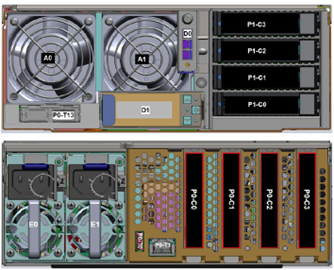
Rack - Front and rear location codes
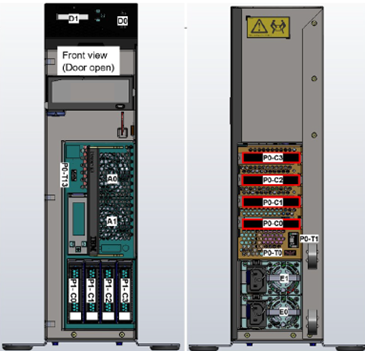
Tower - Front and rear location codes
Location code table
PCIe subsystem
I/O subsystem
The Power S1112 provides four internal direct-attach PCIe slots to provide connectivity to devices and networking. Up to 4 NVMe drives are supported.
There is support for one PCIe Gen4 I/O Expansion Drawer with one PCIe4 6-Slot Fanout Module for an additional six PCIe Gen4 slots.
One USB 3.0 port in the front to support an optional external stand-alone USB-DVD device.
PCIe slots
There are four internal direct-attach PCIe slots provided in the Power S1112. One slot is required for a LAN card for connectivity to the system. The other three are available for other PCIe requirements. All of the slots support Gen4 adapters. PCIe is compatible with earlier generations, therefore these slots also support earlier card generations. Internal direct-attach PCIe slots are not concurrently maintainable and do not have hot plug controllers for concurrent maintenance.
LAN
The S1112 does not have a LOM (LAN on Motherboard). The S1112 uses a PCIe Ethernet Adapter card. The default ethernet card is PCIe LP 4-Port 1GbE Adapter, but the adapter can be replaced by other ethernet adapters. The placement for the adapter will follow the normal plugging rules, rather than be forced into a specific slot.
Internal storage
NVMe (non-volatile memory express) SSDs (solid state drives), in the 15mm U.2 2.5" form factor, are used for internal storage in the S1112. Up to 4 NVMe drives are supported by the riser card. The NVMe drive is limited to 3.2TB. Maximum of 12.8 TB of internal storage. There is no SAS backplane support.
USB ports
One USB 3.0 host controller is used to provide 2 USB 3.0 ports. One USB 3.0 port in the front to support an optional external stand-alone USB-DVD device for OS load from DVD. One internal USB 3.0 port that is unused. The host USB controller can be unconfigured by the customer by using the Enterprise BMC System Management.
PCIe Gen4 I/O Expansion Drawer
The PCIe Gen4 I/O Expansion Drawer is a 4U-high, 19-inch-wide, PCIe Gen4-based rack-mountable I/O drawer that is available as a feature of Power11 processor-based servers. There is support for one PCIe Gen4 I/O Expansion Drawer with one PCIe4 6-Slot Fanout Module providing six PCIe GEN4 slots. The PCIe Gen4 I/O Expansion Drawer is not supported on the Tower (9242-21T) model.
PCIe generation support
There are four direct-attach PCIe slots available in the Power S1112. All slots support Gen4 adapters. There are two PCIe G4 x16 direct slots and two PCIe G4 x8 direct with x16 connector Slot. PCIe is compatible with earlier generations, therefore these slots also support earlier card generations.
The S1112 does not support PCIe Gen5 slots. There are no Gen5 adapters available for the S1112.
Slot configuration and limits
PCIe slots
There are four direct-attach PCIe slots provided in the Power S1112, which support half-height, half-length card formats for connectivity to networks and external storage. One slot is required for a LAN card for connectivity to the system. The other three are available for other PCIe requirements. All of the slots support Gen4 adapters. PCIe is compatible with earlier generations, therefore these slots also support earlier card generations.
Slot properties
The following table indicates what each PCIe slot in the system can support. It does not include plugging rule limitations or other system configuration limitations. PCIe slots are not concurrently maintainable and do not have hot plug controllers for concurrent maintenance.
General rules for PCIe adapters
PCIe adapters can only be placed in PCIe slots.
Place x1, x4, x8, and x16 speed adapters in same connector size slots first, before mixing adapter speed with connector slot size.
Adapters with smaller speeds are allowed in larger sized PCIe connectors but larger speed adapters are not compatible in smaller connector sizes (i.e. a x16 adapter cannot go in an x8 PCIe slot connector).
General rules for adapter plugging
The x16 slots have some performance benefit over the x8 slots.
There is no default plugging scheme. Please see the adapter plugging tables below for slot plugging sequences.
The sequence of adapters in the CEC placement tables are arranged in semi-priority placement order. Those adapters shown higher (nearer the top of the table) are to be considered first for placement within the CEC over those adapters listed further down. If there are multiple adapters with the exact same slot placement sequence, it does not matter which of those adapters, from the group, is chosen first (or next) to be placed in the CEC.
CEC PCIe card placements
Notes details
-
Support Only, Not Orderable.
-
The S1112 (9242-21B) supports a single PCIe CXP converter adapter (#EJ24) card, that must be placed in slot C2, as no other slots have the cable card circuitry to support it. S1112 supports one IO Expansion drawer (#ENZ0) with one FOM only (#ENZF). #EJ24 is orderable only on S1112 drawer model (9242-21B).
-
Qty. 1 of any of these LAN features required on all Initial orders. #EN2Y #EN2X #EC71 #EC73
-
Not available in China Mainland.
-
Must be field install.
-
Not available for #ENZ0
Supported PCIe adapters
The following PCIe adapters are supported in the S1112 CEC at general availability.
S1112 expansion capabilities
Support for PCIe Gen4 I/O Expansion Drawer
The S1112 (9149-21B) has support for the PCIe Gen4 I/O Expansion Drawer. The PCIe Gen4 I/O Expansion Drawer is a 4U-high, 19-inch-wide, PCIe Gen4-based rack-mountable I/O drawer that is available as a feature of Power11 processor-based servers. There is support for one PCIe Gen4 I/O Expansion Drawer with one PCIe4 6-Slot Fanout Module (FOM) providing six PCIe GEN4 slots. A 3.0M CXP x16 copper cable pair is required to attach the PCIe Cable Adapter to the Fanout Module.
The PCIe Gen4 I/O Expansion Drawer is not supported on the Tower (9242-21T) model.
PCIe Gen4 I/O Expansion Drawer
The 19 inch, 4 EIA (4U) PCIe Gen4 I/O Expansion Drawer (#ENZ0) and one PCIe Fan-out Module (#ENZF) provide 6 PCIe Gen4 full-length, full-height slots. The FOM provides six PCIe slots C0 - C5. Slots C0 - C3 are x16, and slots C4 and C5 are x8. PCIe Gen1, Gen2, and Gen3 full-height adapters are also supported. Each PCIe Gen4 I/O Expansion Drawer has two power supplies.
I/O expansion card
A PCIe CXP converter adapter (#EJ24) is required in Slot C2 in the system node and a 3.0M CXP x16 copper cable pair (#ECLS) is used for the system node-to-FOM connection.
Copper cable pair
3.0 m CXP x16 Copper Cable Pair for PCIe4 Expansion Drawer (#ECLS). This 3.0 m cable pair connects a PCIe4 FOM in the PCIe Gen4 I/O Expansion Drawer to a PCIe4 optical converter adapter in the system unit. The pair includes two identical copper cables, each with two CXP connectors. One cable attaches to the top CXP port of the PCIe4 FOM and the top CXP port of the PCIe4 optical converter adapter. The other cable attaches to the bottom CXP ports.
Fanout module
The PCIe Gen4 Fanout Module (#ENZF) is the FOM for placement in the PCIe Gen4 I/O Expansion Drawer. The FOM provides six PCIe Gen4 slots (four x16 and two x8). All six slots, including the x8 slots, use x16 connectors. The FOM is required in location P0 of the drawer (#ENZ0), which is on the left side of the drawer when viewed from the rear.
Blind swap cassette
A blind swap cassette (BSC) houses the full-height adapters that are installed in these slots. The BSC is the same as the one that is used with the previous-generation (#EMX0) drawer. The drawer is shipped with a full set of BSCs.
Concurrent repair
Concurrent repair and adding or removing expansion drawers and PCIe adapters is done through HMC-guided menus or by OS support utilities.

PCI slots that are available in the PCIe Gen4 Expansion Drawer
The following table lists the PCI slots in the PCIe Gen4 I/O Expansion Drawer that is equipped with one PCIe4 6-slot FOM.
Note:
- All slots are PCIe Gen4 slots.
- All slots support full-length, full-height adapters or short form-factor adapters with a full-height tail stock in single-wide, Gen3, BSCs.
- Slots C0 - C3 in each PCIe Gen4 six-slot FOM are PCIe Gen4 x16 buses, and slots C4 and C5 are PCIe Gen4 x8 buses.
- All slots support EEH.
- All PCIe slots can be serviced with the power on.
- All six slots in a PCIe Gen4 six-slot FOM support SR-IOV shared mode.
- Only four adapters with Feature Code #EC2S, #EC2U, or #EC72 can operate in SR-IOV mode simultaneously per six-slot FOM.
Supported PCIe adapters
The following PCIe adapters supported in the PCIe Gen4 I/O Expansion Drawer at general availability.
Configuration options and limits
Expansion I/O drawer
-
The S1112 (9149-21B) supports one PCIe Gen4 I/O Expansion Drawer.
-
The expansion drawer can be configured with:
-
One PCIe4 6-slot fanout module
-
Six PCIe Gen4 adapter slots (four x16 and two x8, all using x16 connectors)
-
Configuration limits and requirements
-
Additional I/O is only provided through PCIe adapters and the I/O drawer.
-
Only one expansion drawer is supported.
-
A single PCIe Gen4 x16 to CXP converter adapter is supported:
-
Must be installed in slot C2
-
Supports copper cables only
-
-
The PCIe Gen4 I/O Expansion Drawer is not supported on the Tower (9242-21T) model.
-
External NVMe drawer not supported.
Serviceability
-
Concurrent add/remove and repair operations are supported through:
-
HMC-guided menus
-
OS support utilities
-
Storage configuration and limitations for Power S1112
Internal storage for the S1112 is limited to NVMe (non-volatile memory express) SSDs (solid state drives), in the 15mm U.2 2.5" form factor. A maximum of four U.2 NVMe drives are supported. The NVMe drive is limited to 3.2TB. The S1112 is limited to a maximum capacity of 12.8 TB internal storage. There is no NVMe storage drawer support. External storage is limited to a stand-alone USB-DVD device or SAN.
Internal storage
-
4x NVMe Slots
-
0.8 TB 4K U.2 15 mm 18 W PCIe Gen4 Enterprise Class
-
1.6 TB 4K U.2 15 mm 18 W PCIe Gen4 Enterprise Class
-
3.2 TB 4K U.2 15 mm 18 W PCIe Gen4 Enterprise Class
-
Max 12W
-
12.8 TB Capacity Max
External storage
-
External stand-alone USB-DVD device.
-
External SAN storage is supported by using the appropriate SAN cards.
-
No Support for External Storage Drawers
-
No Support for RDX
NVMe capabilities and internal storage
NVMe drives
The Power S1112 has four internal NVMe drive slots. The drive communications and power are provided through cables to the system board. High-speed Oculink cables are used for the PCIe and control signals.
The NVMe slots in the riser card are 15 mm slots, which support 15 mm NVMe U2 drives that use a 15 mm carrier. Each NVMe drive can be independently assigned to an LPAR for use as a boot disk or as data storage. The NVMe U2 drives support concurrent add, remove, and replace. The NVMe drive is limited to 3.2TB.
The following NVMe drives are available at general availability.
Configuration limits and requirements
-
Up to 4 NVMe drives are supported for internal storage.
-
Mixing is allowed of 15mm drives and mixing of capacities is allowed.
-
The NVMe drive is limited to 3.2TB.
-
The S1112 is limited to a maximum capacity of 12.8 TB internal storage.
-
Mixing allowed between AIX/Linux and IBM i drives.
-
IBM i requires NVMe devices to be ordered starting with an initial pair with same capacity, after that an odd number is supported but NVMe namespaces must still be mirrored.
-
Ordered NVMe must be placed in the CEC.
-
If no #0837 (SAN BOOT), or #ESCZ (ISCI SAN Boot), as the Load Source is ordered, then at least one NVMe (AIX/Linux) or two (IBM i) disk units required to be ordered. If SAN Boot is ordered, then an adapter that supports Fibre Channel protocols must be ordered/present on the system instead.
-
There is no SAS backplane supported on the S1112.
Serviceability
-
NVMe drive concurrent maintenance is supported.
-
There are no NVMe drive slot placement priorities or placement priorities by disk unit capacity.
-
For a default placement/plugging rule per backplane, start at the start at C0 and plug in sequence to C3.
External storage connectivity
USB 3.0 port
One USB 3.0 host controller is used to provide 2 USB 3.0 ports:
-
Front USB 3.0 port: Supports an optional external stand-alone USB-DVD device
-
Internal USB 3.0 port: Currently unused
The host USB controller can be unconfigured by the customer by using the Enterprise BMC System Management.
SAN
External SAN storage is supported by using the appropriate SAN cards placed in one of the 4 internal PCIe slots or one of the six PCIe Gen4 I/O Expansion Drawer slots, which are either:
-
Fibre Channel connected
-
Ethernet connected
No support for external storage drawers
Based on the use cases for this server, there is no plan to enable expansion of the number of NVMe storage devices.
No support for RDX
RDX drive is no longer supported.
When should I consider I/O bandwidth limitations?
What this covers
This decision guide helps you identify when I/O bandwidth becomes a constraint on Power S1112 systems. You'll learn how to assess adapter bandwidth requirements, recognize bottleneck symptoms, and determine when PCIe Gen 4 bandwidth limitations necessitate workload optimization, adapter consolidation, or migration to higher-end Power11 systems.
What is it
I/O bandwidth limitations occur when the aggregate data throughput requirements of your PCIe adapters approach or exceed the available PCIe Gen 4 bandwidth capacity. The Power S1112 provides PCIe Gen 4 connectivity with specific bandwidth characteristics per slot type:
System unit PCIe slots (4 total):
- 2 slots: PCIe Gen 4 x16 physical, x16 electrical (~32 GB/s bidirectional bandwidth each)
- 2 slots: PCIe Gen 4 x16 physical, x8 electrical (~16 GB/s bidirectional bandwidth each)
ENZ0 Expansion Drawer (adds 6 slots):
- 4 slots: PCIe Gen 4 x16 (~32 GB/s bidirectional bandwidth each)
- 2 slots: PCIe Gen 4 x8 (~16 GB/s bidirectional bandwidth each)
Bandwidth limitations manifest when high-throughput adapters—such as 100GbE network cards, multiple 25GbE adapters, 64Gb Fibre Channel HBAs, or NVMe storage controllers—collectively demand more bandwidth than available PCIe lanes can deliver. Unlike slot exhaustion (running out of physical slots), bandwidth saturation occurs when slots remain available but cannot support additional high-performance adapters without performance degradation.
Why it matters
Bandwidth bottlenecks directly impact application performance, creating cascading effects across your infrastructure. Database transaction rates decline when storage controllers cannot sustain required IOPS. Network-intensive applications experience increased latency and reduced throughput when network adapters compete for insufficient bandwidth. Virtualized environments suffer when consolidated workloads overwhelm I/O capacity.
Business impact: A database server with dual 25GbE network adapters and dual 32Gb Fibre Channel HBAs can theoretically demand 18.75 GB/s aggregate bandwidth (12.5 GB/s network + 6.25 GB/s storage). If these adapters share PCIe Gen 4 x8 slots (~16 GB/s each), bandwidth contention during peak operations degrades both network and storage performance simultaneously.
Cost of inadequate planning: Organizations that fail to assess bandwidth requirements may deploy systems incapable of supporting production workloads, necessitating emergency hardware upgrades, workload redistribution, or premature system replacement. Unlike adding expansion drawers for more slots, bandwidth limitations cannot be resolved without architectural changes, either adapter consolidation, workload optimization, or migration to higher-end Power11 systems with PCIe Gen 5 support.
Performance degradation symptoms: Bandwidth saturation manifests as unexplained application slowdowns despite adequate CPU and memory resources, increased I/O wait times, network throughput below adapter specifications, and storage latency spikes during concurrent operations. These symptoms often appear intermittently during peak usage, making diagnosis challenging without systematic bandwidth analysis.
How it works
Understanding PCIe Gen 4 bandwidth
PCIe Gen 4 provides approximately 2 GB/s per lane in each direction (bidirectional). Slot bandwidth calculations:
x16 slots: 16 lanes × 2 GB/s = ~32 GB/s bidirectional (16 GB/s each direction) x8 slots: 8 lanes × 2 GB/s = ~16 GB/s bidirectional (8 GB/s each direction)
These are theoretical maximums. Real-world throughput is typically 85-90% of theoretical due to PCIe protocol overhead, encoding, and error correction.
Bandwidth assessment methodology
Step 1: Inventory current adapters
Document each adapter's maximum theoretical bandwidth and expected utilization:
Step 2: Identify peak concurrent operations
Bandwidth bottlenecks occur during simultaneous high-throughput operations:
- Database backup while serving production queries
- Large file transfers concurrent with storage replication
- Multiple virtual machines performing I/O-intensive operations simultaneously
Calculate worst-case bandwidth demand assuming all adapters operate at peak utilization concurrently.
Step 3: Recognize warning thresholds
Green zone (0-50% slot bandwidth): Healthy headroom for growth and peak operations Yellow zone (50-75% slot bandwidth): Monitor performance; plan capacity expansion Red zone (75-100% slot bandwidth): Bandwidth saturation likely during peak operations; immediate action required
When to consider bandwidth limitations
Immediate concern scenarios:
-
High-bandwidth adapter deployment:
- Deploying 64Gb Fibre Channel HBAs
- Adding multiple 25GbE adapters for network redundancy
-
Slot bandwidth saturation:
- Single adapter consuming more than 75% of slot bandwidth
- Concurrent operations causing performance degradation
-
Workload characteristics:
- Large database servers with high transaction rates
- Data analytics platforms processing large datasets
- Virtualization hosts with I/O-intensive workloads
- Storage servers with multiple concurrent backup/replication operations
-
Performance symptoms:
- Network throughput below adapter specifications
- Storage latency spikes during concurrent operations
- Application slowdowns despite adequate CPU/memory
- Increased I/O wait times in system monitoring
Planning considerations:
Adapter placement strategy: Place highest-bandwidth adapters in x16 slots. Reserve x8 slots for lower-bandwidth adapters. Workload optimization: Schedule bandwidth-intensive operations (backups, replication) during off-peak hours to avoid concurrent bandwidth contention.
Adapter consolidation: Consider multi-port adapters to reduce slot count while maintaining bandwidth. Example: Single quad-port 25GbE adapter instead of two dual-port adapters.
Bandwidth limitation solutions
Within S1112 architecture:
-
Optimize adapter placement:
- Move high-bandwidth adapters to x16 slots
- Distribute bandwidth-intensive adapters across multiple slots
- Use ENZ0 expansion drawer x16 slots for additional high-bandwidth capacity
-
Workload scheduling:
- Stagger backup operations to avoid concurrent bandwidth peaks
- Implement QoS policies to prioritize critical traffic
- Schedule data replication during low-utilization periods
-
Adapter technology selection:
- Use lower-speed adapters where maximum bandwidth isn't required
- Implement link aggregation for redundancy without bandwidth multiplication
- Consider adapter offload features (TCP/IP offload, RDMA) to reduce CPU overhead
Migration indicators:
Consider higher-end Power11 systems (S1122, S1124, E1150, E1180) when:
- PCIe Gen 5 adapters are required for next-generation performance
- Mission-critical applications cannot tolerate bandwidth contention
- Concurrent high-bandwidth operations are unavoidable
Key takeaways
- PCIe Gen 4 bandwidth: ~32 GB/s per x16 slot, ~16 GB/s per x8 slot (bidirectional)
- S1112 system unit: 2× x16 slots + 2× x8 slots (physical x16, electrical x8)
- ENZ0 expansion: 4× x16 slots + 2× x8 slots
- Monitor slot bandwidth utilization; more than 75% indicates saturation risk
- Place highest-bandwidth adapters in x16 slots
- Schedule bandwidth-intensive operations to avoid concurrent peaks
- Bandwidth limitations cannot be resolved by adding expansion drawers
- Consider higher-end Power11 systems when aggregate bandwidth exceeds 200 GB/s
- PCIe Gen 5 support (higher-end systems) provides ~2× bandwidth per slot
When should I plan for I/O scalability and expansion?
What this covers
This decision guide helps you determine when to plan I/O expansion for Power S1112 systems. You'll learn when the base 4 PCIe Gen 4 slots become insufficient, when to add the ENZ0 expansion drawer (increasing capacity to 9 slots), and how to assess bandwidth limitations that necessitate expansion planning.
What is it
I/O scalability planning is the proactive assessment of current and future adapter requirements to prevent performance bottlenecks and system limitations. The Power S1112 base configuration provides 4 PCIe Gen 4 slots, which can be expanded to 9 total slots by adding one half ENZ0 expansion drawer (adding 6 additional slots, but utilizing one slot in the system unit for the Converter Card).
Three primary factors drive expansion planning:
Slot exhaustion: When your workload requires more than 4 PCIe adapters for network connectivity, storage controllers, or specialized hardware.
Bandwidth saturation: When aggregate I/O throughput approaches or exceeds available PCIe Gen 4 bandwidth. Each PCIe Gen 4 x8 slot provides approximately 16 GB/s bidirectional bandwidth, while x16 slots deliver 32 GB/s.
Future-proofing: When anticipated workload growth within 12-24 months will require additional I/O capacity, making proactive expansion more cost-effective than reactive upgrades.
Why it matters
Inadequate I/O planning creates significant business risks. Adding expansion drawers requires planned system downtime, making emergency expansions disruptive and costly. Performance bottlenecks from insufficient I/O capacity directly impact application responsiveness, database transaction rates, and network throughput, potentially halting critical business operations.
Budget optimization depends on accurate planning. Purchasing expansion capacity during initial system acquisition is more economical than emergency procurement. Additionally, insufficient I/O flexibility limits your ability to implement high-availability configurations, add backup infrastructure, or deploy new applications.
Consider a database server requiring dual 25GbE network adapters for redundancy, two SAN storage controllers, and a tape backup controller, that's 5 adapters exceeding the base 4-slot configuration. Without expansion planning, you face either compromising redundancy or delaying deployment while procuring expansion hardware.
The cost of inadequate planning extends beyond immediate expenses. Systems that cannot scale I/O capacity may require premature replacement with higher-end Power11 models, representing significantly larger capital expenditure than planned expansion.
How it works
Assess current I/O requirements
Begin by inventorying required PCIe adapters by category:
Network adapters: Typically 1-2 adapters for redundancy (10GbE, 25GbE, or 100GbE). High-bandwidth adapters like 100GbE can consume 50-75% of a single PCIe Gen 4 x16 slot's bandwidth under heavy load.
Storage controllers: Fibre Channel HBAs for SAN connectivity. Each controller typically requires x8 or x16 slots.
Specialized adapters: Backup/tape controllers, cryptographic accelerators, or workload-specific hardware.
Calculate bandwidth requirements per adapter. A dual-port 25GbE adapter can theoretically consume 6.25 GB/s (50 Gbps total), representing approximately 40% of a PCIe Gen 4 x8 slot's capacity. Multiple high-bandwidth adapters sharing limited slots create contention.
Plan for growth
Project I/O requirements 3-5 years forward, considering:
- Network expansion: Upgrading from 10GbE to 25GbE or 100GbE adapters
- Storage growth: Additional controllers for capacity expansion or performance tiers
- Virtualization density: Consolidated workloads increase I/O demands per physical system
- New applications: Each new workload may introduce unique I/O requirements
Reserve 30-40% I/O capacity for growth. If you're using 3 of 4 base slots today, you're at 75% utilization—time to plan expansion.
Expansion decision points
Plan ENZ0 expansion when:
- Currently using 3 or more base slots (75%+ utilization)
- Any single adapter's bandwidth exceeds 50% of its slot capacity during peak operations
- Workload growth requiring additional adapters is projected within 12 months
- High-availability requirements demand adapter redundancy you cannot currently implement
- Bandwidth-intensive applications (large databases, data analytics, AI inference) are planned
ENZ0 expansion drawer benefits:
- Adds 6 PCIe Gen 4 slots (150% capacity increase)
- Maintains full PCIe Gen 4 performance across all slots
- Supports hot-plug operations for improved serviceability
Key takeaways
- Power S1112 base configuration: 4 PCIe Gen 4 slots; with ENZ0 expansion: 9 total slots
- Plan expansion when using 3+ base slots or anticipating growth within 12 months
- PCIe Gen 4 bandwidth: ~16 GB/s per x8 slot, ~32 GB/s per x16 slot
- Bandwidth saturation, not just slot count, drives expansion needs
- High-bandwidth adapters (100GbE, NVMe) can saturate individual slots
- ENZ0 expansion adds 6 slots without performance compromise
- Budget expansion during initial purchase if growth is likely within 24 months
- Expansion requires planned downtime—avoid emergency additions
- Reserve 30-40% I/O capacity for future workload growth
- Consider adapter redundancy requirements for high-availability configurations
What I/O limitations does the Power S1112 have?
What this covers
This reference identifies specific I/O limitations of the Power S1112 that distinguish it from more capable Power11 systems and determine when workload requirements necessitate migration to larger-scale platforms. Understanding these boundaries is critical for accurate system sizing, capacity planning, and deployment decisions.
Why it matters
Recognizing S1112 I/O limitations prevents costly deployment mistakes and performance bottlenecks. These constraints directly impact adapter selection, storage architecture, expansion planning, and high-availability configurations. Deploying workloads that exceed S1112 capabilities results in compromised redundancy or performance degradation, while inadequate planning can lead to premature system replacement.
PCIe architecture and slot limitations
Slot capacity: Maximum 9 PCIe Gen 4 slots
- Base system: 4 slots (2× x16, 2× x8 electrical with x16 connectors)
- With ENZ0 expansion: 9 slots total (3 usable in base + 6 in drawer)
Note: Slot C2 consumed by EJ24 converter card for ENZ0 connectivity
PCIe generation: Gen 4 only—no PCIe Gen 5 support
- PCIe Gen 4 x16: ~32 GB/s bidirectional bandwidth
- PCIe Gen 4 x8: ~16 GB/s bidirectional bandwidth
- More capable Power11 systems (S1122, S1124, E1150, E1180) support PCIe Gen 5 with approximately double the bandwidth per slot
Migration trigger: Workloads requiring more than 9 adapters, PCIe Gen 5 devices, or aggregate bandwidth exceeding 200 GB/s necessitate more capable systems.
Expansion drawer constraints
Maximum expansion: One half-populated ENZ0 I/O drawer only
- Single PCIe4 6-Slot Fanout Module providing 6 additional slots
- Must be same-rack placement with S1112 system unit
- 3-meter CXP Gen4 copper cables exclusively (no optical, no extended length)
- Not supported on tower model (9242-21T)
This proximity requirement impacts data center layout flexibility and may complicate rack planning in space-constrained environments.
Migration trigger: Requirements for multiple expansion drawers, separate-rack placement (more than 3 meters), optical connectivity, or tower form factor with expansion capability require more capable systems.
Storage architecture boundaries
Internal NVMe storage:
- Maximum 4× NVMe U.2 drives (15mm form factor)
- Maximum capacity: 12.8 TB (4× 3.2 TB drives)
- No SAS attached storage support
NVMe expansion: NED24 NVMe expansion drawer not supported
The S1112 does not support the NED24 NVMe expansion drawer, eliminating access to high-performance, high-capacity NVMe storage expansion available on more capable Power11 systems.
Migration trigger: Requirements exceeding 12.8 TB internal storage or need for NED24 expansion drawer for storage-intensive applications necessitate more capable platforms.
Concurrent maintenance limitations
System unit slots: No concurrent maintenance support
- Adapter replacement requires planned system downtime
- No hot-plug capability for adapters in system unit
ENZ0 Expansion Drawer: Concurrent maintenance supported with hot-plug operations
Migration trigger: Service level agreements mandating zero-downtime adapter servicing across all slots, or when planned downtime windows are unavailable for system unit maintenance.
Fibre Channel adapter restrictions
Port density limitations:
- System unit: Only 2-port Fibre Channel adapters supported
- ENZ0 drawer: 4-port adapters supported
32 Gb/s adapter constraints:
- Feature code EN2K: IBM i only, tape storage attachment exclusively
64 Gb/s adapter constraints:
- Feature code EN1P/EN1N (Emulex-based): Supported
- Feature code EN2P/EN2N (Marvell QLE2882-IBMP-based): Not supported
These restrictions limit adapter selection flexibility and may impact organizations with existing Marvell-based infrastructure or specific vendor requirements for SAN connectivity.
Migration trigger: Requirements for Marvell-based 64 Gb/s adapters or 4-port density in system unit necessitate more capable systems.
Network adapter limitations
Feature code EC73 restriction: The 2-Port 25/10/1 Gb Ethernet adapter (feature code EC73) is supported exclusively by IBM i operating system. AIX and Linux deployments requiring this adapter specification must select alternative feature codes or consider more capable systems with broader adapter support.
Migration trigger: AIX or Linux workloads specifically requiring EC73 adapter capabilities with no alternative adapters meeting requirements.
Aggregate bandwidth boundary
Theoretical maximum (with ENZ0):
- System unit: 96 GB/s (
2× x16 + 2× x8 slots) - ENZ0 drawer: 160 GB/s (
4× x16 + 2× x8 slots) - Total: ~256 GB/s bidirectional
Practical considerations:
- Real-world throughput: 85-90% of theoretical (~200 GB/s practical ceiling)
- Bandwidth contention occurs when multiple high-throughput adapters share limited lanes
Migration trigger: Aggregate bandwidth requirements exceeding 200 GB/s during peak operations, individual adapters consistently utilizing more than 75% of slot bandwidth, or performance degradation during concurrent I/O operations.
When to consider more capable Power11 systems
Immediate migration indicators:
- Workload requires more than 9 PCIe adapters
- PCIe Gen 5 adapters mandated by application specifications
- Internal storage requirements exceed 12.8 TB
- Multiple expansion drawers required
- Expansion drawer must be in separate rack (more than 3 meters)
- Aggregate bandwidth requirements exceed 200 GB/s
- Zero-downtime adapter servicing mandatory across all slots
- Marvell-based 64 Gb/s FC adapters required
- 4-port FC adapters needed in system unit
Planning considerations: If current I/O utilization is 70-80% of S1112 capacity with growth anticipated within 24 months, proactive migration to more capable systems is more cost-effective than interim expansion followed by later migration.
Key takeaways
- Maximum 9 PCIe Gen 4 slots (4 base + 6 expansion with ENZ0)
- PCIe Gen 4 only; no PCIe Gen 5 support
- Single half-populated ENZ0 drawer maximum; same-rack placement required
- 3-meter copper cables only for ENZ0 connectivity
- Tower model (9242-21T) does not support ENZ0 expansion
- Maximum 12.8 TB internal NVMe storage (4× 3.2 TB drives)
- No NED24 NVMe expansion drawer support
- No concurrent maintenance on system unit PCIe adapters
- 2-port FC adapters only in system unit; 4-port in ENZ0
- EN1P/EN1N (Emulex) 64 Gb/s FC supported; EN2P/EN2N (Marvell) not supported
- EN2K 32 Gb/s FC: IBM i tape storage only
- EC73 network adapter: IBM i only
- Practical bandwidth ceiling: ~200 GB/s
- Designed for moderate I/O workloads; I/O-intensive applications benefit from more capable systems
- Migration required when any boundary is exceeded
Which workload profiles are suitable for Power S1112 I/O capabilities?
What this covers
This decision guide helps you determine whether your workload's I/O patterns align with Power S1112 capabilities or require higher-end Power11 systems. The S1112 (GA: July 24, 2026) delivers up to 2.5X more performance per core versus previous generations while reducing IT footprint by up to 75% compared to previous 1S4U models.
Why it matters
Matching workload I/O patterns to system capabilities prevents performance bottlenecks and costly deployment mistakes. The S1112 is designed for small businesses with moderate I/O requirements, offering Transparent Memory Encryption and built-in AI acceleration (MMA). Deploying I/O-intensive workloads on S1112 results in performance degradation, while over-provisioning wastes budget.
S1112 I/O architecture overview
Base configuration: 4 PCIe Gen 4 slots (2× x16, 2× x8 electrical) With ENZ0 expansion: 9 total slots (3 usable in base + 6 in drawer) Internal storage: Maximum 4× NVMe U.2 drives (12.8 TB max capacity) Bandwidth: Practical limit ~200 GB/s
Workload profiles well-suited for S1112
IBM i systems upgrade
I/O pattern: Moderate transaction volumes, sequential and random database I/O, network traffic under 10 Gbps sustained.
Adapter requirements: 1-2 network adapters (10GbE/25GbE), 1-2 storage controllers (16Gb/32Gb FC).
Why it works: Delivers 2.5X more performance per core with 75% footprint reduction. Transparent Memory Encryption protects data without application changes. Cost-effective HA/DR configurations—a pair of S1112 systems saves 50% rack space versus previous generations.
Examples: Small-medium IBM i ERP systems, database servers, branch office applications, backup/DR systems.
Small business applications and databases
I/O pattern: Sequential reads/writes with occasional random access, network under 10 Gbps, storage I/O under 50,000 IOPS.
Adapter requirements: 1-2 network adapters, 1-2 storage controllers, optional backup controller.
Why it works: Base 4-slot configuration accommodates redundant networking and storage. Internal NVMe provides sufficient performance. Transparent Memory Encryption secures data without performance impact.
Examples: Small ERP systems, departmental databases (Oracle, DB2, PostgreSQL, MySQL), file servers, email servers.
Branch office and remote sites
I/O pattern: Intermittent bursts during business hours, network under 5 Gbps, primarily sequential storage access.
Adapter requirements: Single network adapter, single storage controller or internal NVMe only.
Why it works: 75% footprint reduction enables space-constrained deployments. Tower form factor (9242-21T) fits office environments. Lower power consumption with 80+ Titanium supplies reduces facility costs.
Examples: Remote office servers, regional database replicas, edge computing, retail point-of-sale, branch operations.
Edge AI inferencing
I/O pattern: Moderate sustained throughput for model loading, network under 10 Gbps, storage for model files and local caching.
Adapter requirements: 1-2 network adapters, internal NVMe storage.
Why it works: Built-in MMA acceleration eliminates discrete GPU adapters, saving PCIe slots, power, and cooling. Transparent Memory Encryption secures data flowing through AI models. Reduced latency from local processing.
Examples: Retail AI inferencing, manufacturing edge analytics, remote predictive maintenance, branch office automation.
Development and test environments
I/O pattern: Variable and unpredictable. Performance degradation acceptable. No strict SLA requirements.
Adapter requirements: Minimal redundancy. Single network adapter and storage controller sufficient.
Why it works: Cost-effective platform for non-critical workloads. Base configuration meets most development needs without expansion investment.
Examples: Development servers, QA environments, training systems, proof-of-concept deployments, DevOps farms.
Virtualized small workloads
I/O pattern: Distributed I/O across 3-8 LPARs prevents single-adapter saturation. Aggregate bandwidth under 100 GB/s.
Adapter requirements: 2-4 physical adapters shared via PowerVM virtual I/O.
Why it works: PowerVM efficiently shares I/O resources. ENZ0 expansion provides sufficient slots for VIOS redundancy. Support for PowerVM and KVM enables hybrid cloud strategies.
Examples: Consolidated departmental servers, multi-tenant hosting, mixed OS development, hybrid cloud edge deployments.
Workload profiles requiring higher-end systems
High-transaction database servers
Why S1112 insufficient: Sustained IOPS >100,000, network >25 Gbps, storage bandwidth >10 GB/s exceed PCIe Gen 4 limits. Lack of NED24 NVMe expansion limits storage scaling. Consider S1122+ with PCIe Gen 5.
Data analytics and AI training
Why S1112 insufficient: S1112 supports AI inferencing via built-in MMA but not AI training. No Spyre accelerator support. Limited 12.8 TB storage insufficient for large training datasets. Network >50 Gbps and storage >20 GB/s exceed capabilities. Consider E1150/E1180 with Spyre and NED24 expansion.
Storage-intensive applications
Why S1112 insufficient: Maximum 4 NVMe drives (12.8 TB) inadequate for large repositories, media streaming, or concurrent backup operations. No NED24 expansion. Consider S1124+ with expanded storage architecture.
High-availability mission-critical systems
Why S1112 insufficient: Maximum 9 slots insufficient for full redundancy with growth capacity. No concurrent maintenance on system unit adapters requires planned downtime. Consider S1122+ with hot-plug capabilities.
Decision framework
Choose S1112 when:
- Adapter requirements: 4-8 total PCIe adapters
- Network bandwidth: Sustained <25 Gbps aggregate
- Storage IOPS: <50,000 sustained
- Internal storage: <12.8 TB sufficient
- User concurrency: <100 simultaneous users
- Planned downtime: Acceptable for maintenance
- AI inferencing workloads (built-in MMA acceleration)
- IBM i systems upgrade from older platforms
- Branch/remote office deployments requiring reduced footprint
- Cost-effective HA/DR configurations
Choose higher-end Power11 when:
- Adapter requirements: >9 PCIe adapters
- Network bandwidth: Sustained >25 Gbps
- Storage IOPS: >100,000 sustained
- PCIe Gen 5 adapters required
- Zero-downtime maintenance mandatory
- AI training workloads (Spyre acceleration required)
- NED24 NVMe expansion needed
- Storage capacity requirements >12.8 TB
Key takeaways
- S1112 (GA: July 24, 2026) delivers 2.5X more performance per core with 75% footprint reduction versus previous 1S4U models
- Enterprise-grade security with Transparent Memory Encryption and built-in AI acceleration (MMA) for inferencing
- Well-suited for: IBM i upgrades, small business applications, branch offices, edge AI inferencing, development environments, light virtualization
- Not suitable for: high-transaction databases (>100K IOPS), AI training (requires Spyre), storage-intensive applications (>12.8 TB), zero-downtime HA systems
- Maximum 9 PCIe Gen 4 slots with ~200 GB/s practical bandwidth ceiling
- Internal storage: 4× NVMe U.2 drives maximum (12.8 TB total, no SAS support)
- Tower (9242-21T) for offices, rack (9242-21B) for data centers, both with 80+ Titanium power supplies
- Assess workload I/O patterns against S1112 boundaries before deployment