Abstract
This document provides step-by-step guidance for manually deploying IBM Power Virtual Server (PowerVS) with VPC landing zone infrastructure, following IBM Cloud best practices for security, networking, and compliance. The deployment establishes secure hybrid connectivity between on-premises environments and cloud resources using Client-to-Site VPN, Transit Gateway, and layered observability services, optimized for lift-and-shift workloads that preserve existing on-premises architecture.
Authors
Lokesh Bhatt and Vaibhav Shandilya
IBM Power Virtual Server with VPC Landing Zone
Authors
-
Lokesh Bhatt is a senior technology leader with deep expertise in Hybrid Cloud, AI Infrastructure, and mission-critical enterprise platforms. With 20 years of experience, he has led complex modernization programs, architected large-scale SAP and PowerVS deployments, and advised CXOs on cloud transformation strategies. Lokesh bridges business vision with engineering execution, delivering measurable outcomes in performance, resilience, and cost optimization. He collaborates with global product teams, contributes to cloud architecture best practices, and focuses on democratizing AI-enabled infrastructure for enterprises.
-
Vaibhav Shandilya is a technology leader with more than 28 years of experience, specializing in product development and presales across global teams. With more than 17 years at IBM, he leads APAC Client Engineering pilots and proof-of-concept initiatives in hybrid cloud, AI/ML, and Generative AI. Previously, he led IBM Systems Power Techline and assurance teams worldwide, driving technical excellence and partner enablement across global markets. He has led teams securing multimillion-dollar opportunities through technical consulting, aligning technology with business strategy, and mentoring cross-functional teams to drive results. His expertise includes cloud architecture, IBM Cloud Paks, watsonx.ai, watsonx.orchestrate, AI/ML, and Generative AI. He holds a master's degree in Computer Science and has published technical blogs and contributed to an IBM Redbook.
Notices
While IBM® values the use of inclusive language, terms that are outside of IBM's direct influence are sometimes required for the sake of maintaining user understanding. As other industry leaders join IBM in embracing the use of inclusive language, IBM will continue to update the documentation to reflect those changes.
Introduction
This IBM Redbooks® publication provides guidance for deploying IBM Power Virtual Server (PowerVS) with VPC landing zone infrastructure, following IBM Cloud best practices and compliance standards. Perform deployment steps manually rather than using automated templates to gain fine-grained control and customization for each component. This environment is best suited for lift-and-shift workloads, enabling quick application migration while preserving existing on-premises architecture.
Note: As a prerequisite to viewing or instantiating IBM Cloud resources, you must have appropriate IBM Cloud permissions.
IBM Cloud Infrastructure Components
The following figure depicts a typical IBM Power Virtual Server (PowerVS) VPC infrastructure deployment for a representative hybrid cloud use case.
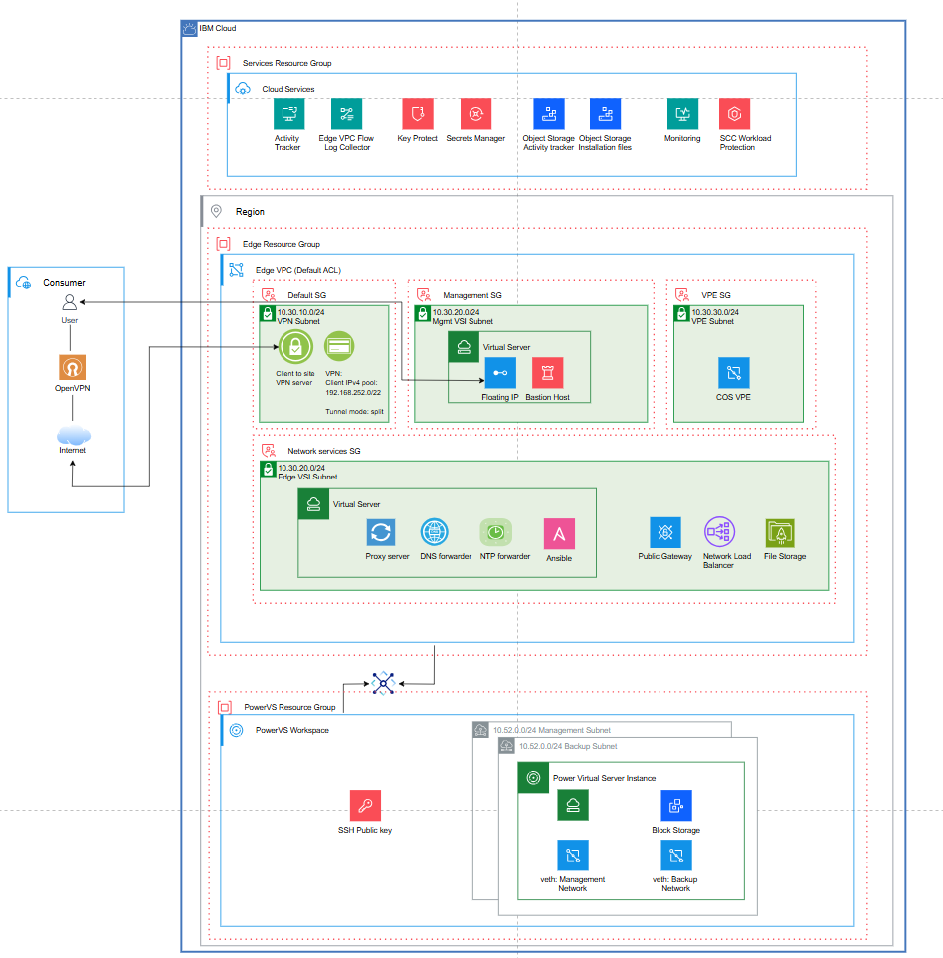
For more information, see Power Virtual Server with VPC landing zone.
The components are grouped in three resource groups:
Edge Resource Group
Edge VPC: Encapsulates IBM Virtual Private Cloud (VPC) capabilities aligned with related Security Groups (SGs). SGs are configured to facilitate network traffic flow in and outside of the VPC component. The VPC security groups and the aligned VPC components are listed in the following sections:
Default Security Group:
- VPC VPN server (OpenVPN Gateway): Client-to-site VPN gateway that enables remote users to connect directly to VPC resources using OpenVPN clients. It supports secure tunneling using SSL/TLS to connect users or external networks to the Edge VPC over encrypted tunnels.
Management Security Group (
- Bastion Host with floating IPs: Bastion host is the controlled entry point for SSH/RDP. From the bastion host, you can SSH into other resources (like VMs) within the VPC as long as they allow SSH traffic from the bastion host's IP.
VPE Security Group (
- VPE to IBM Cloud Object Storage and Secrets Manager
- COS VPE: Virtual Private Endpoint for Cloud Object Storage
Network Services SG (
- Internet proxy based on Squid
- NTP server
- DNS forwarder
- Public Gateway
- Network Load Balancer (NLB)
Transit Gateway: Connects multiple VPCs, on-premises networks (via VPN or Direct Link), and other IBM Cloud services into a single routing domain. It acts as a central hub for traffic forwarding.
Note: The transit gateway is not aligned with any specific resource or security group.
Services Resource Group
The Services resource group contains shared platform services and control plane resources. The following platform services are not tied to a specific workload:
- Monitoring
- Activity Tracker
- Secrets Manager
- LogDNA/Edge log collector
- Event notification
PowerVS Resource Group
In the PowerVS Resource Group, IBM® Power® Virtual Server workspace manages IBM PowerVS instances. The instances run Enterprise IBM Power workloads in an IBM Cloud environment. PowerVS subnets include virtual Ethernet management and block storage.
As an initial step, create the resource groups required for the deployment.
Create Resource Groups
Access the IBM Cloud account console. Refer to the account management section for detailed instructions on creating resource groups.
Note: Create three resource groups:
vpclz-edge-rg ,vpclz-services-rg , andvpclz-powervs-rg .
IBM Cloud Resource Provisioning Guidelines
This section provides guidelines for provisioning IBM Cloud resources required for the deployment.
Provision Virtual Private Cloud (VPC) Resources
The following subsections describe provisioning VPC resources within the Edge Resource Group (
Create Edge VPC
Create a Virtual Private Cloud with subnets in the desired region (datacenter location). The Virtual Private Cloud (VPC) houses IBM Cloud resources.
Create the resource.
Create Edge VPC Subnets
VPC subnets provide L3 IP address pools within a single zone. Resources requiring IP addresses are placed into a subnet. The following VPC resources are associated with subnets:
- VPN Gateway
- Virtual Server Instances (VSIs)
- Virtual Private Endpoints (VPEs)
- Public Gateway (PGW)
- Network Load Balancer (NLB)
The following table lists created VPC subnets with the resource mapping:
Provision a VPC VPN Server Instance
Create a Client-to-Site VPN server within the
Use a self-signed certificate for server-side authentication and user name and password credentials for client-side authentication. The Secrets Manager service instance creates a self-signed private certificate. Refer to the IBM Cloud Secrets Manager Service Instance section for guidelines on private certificate creation.
Leave the security group settings at default.
To create the resource, see Client VPN for VPC.
Provision VPC Virtual Server Instances (VSIs)
In this section, provision Red Hat-based VSIs in the VPCs. Two virtual server instances are provisioned in the VPC. The instances use Red Hat 9.x images in IBM Cloud.
Navigate here to create the resource.
Provision a Bastion Host with Floating IP in the edge-vpc-mgmt Subnet
The Bastion Host with SSH in a VPC securely manages and provides access to resources within the VPC. It serves as a jump host for accessing resources in private subnets.
Connect to the Bastion Host using SSH and the Floating IP. The Floating IP provides public access.
Use the following link to create the resource.
Provision a VSI in the edge-vpc-nw-services Subnet
Provision a Red Hat-based Virtual Server Instance (VSI) within the
The VSI provides outbound Internet connectivity through the P-GW. You connect to this instance by using SSH using the Bastion server as the jump host.
To enable IP forwarding on this instance, complete the following steps:
-
Create or edit the sysctl configuration file. Open or create the
99-sysctl.conf file under/etc/sysctl.d/ :sudo vi /etc/sysctl.d/99-sysctl.conf -
Add the following line to the file:
net.ipv4.ip_forward=1 -
Apply the changes. After saving the file, run the following command to apply the changes without rebooting:
sudo sysctl --system This command reads and applies all the settings in the
/etc/sysctl.d/ directory and/etc/sysctl.conf . -
Verify IP forwarding. To verify that IP forwarding is enabled, run
sysctl net.ipv4.ip_forward . It should returnnet.ipv4.ip_forward = 1 .
In this hybrid architecture, the RHEL-based VSI acts as an Internet egress router for PowerVS workloads via IP forwarding. It uses IBM Cloud DNS service with only on-premises clients accessing cloud resources by IP. Additionally, on-premises DNS can be manually updated with local host entries or static A records for cloud servers.
A Network Load Balancer is not required for on-premises clients accessing PowerVS workloads. Traffic flows directly through the Client-to-Site (C2S) VPN into the VPC and across the Transit Gateway to the PowerVS instances. The VPN server serves as the single ingress point, while VPC routing handles delivery to the workloads.
This deployment uses IBM Cloud DNS and default cloud time synchronization services. For enterprise production deployments, you can install or tune additional services to meet auditing, security/compliance, or custom application requirements.
Optional network services on the VSI include the following:
-
Proxy Server: In the minimum deployment, Network Services VSI provides unrestricted TCP/UDP access through P-GW. To allow policy-based outbound traffic, logging, and auditing, you can install a forward proxy (for example, Squid). The Networking VSI runs both IP forwarding (general routing) and Proxy server (TCP 3128/8080). This configuration provides the following outbound traffic options:
- Proxy-aware workloads configure HTTP_PROXY/HTTPS_PROXY to the Network VSI.
- Non-proxy traffic can still be routed via IP forwarding (optional, less controlled). Adding a Proxy Server is recommended in production systems for enterprise-required security, auditability, and protocol restrictions. Non-proxy-aware traffic can be blocked or routed differently, while proxy-aware traffic can be controlled, logged, and cached.
-
DNS Forwarder: To support hybrid DNS for enterprise workloads with cross-environment dependencies, you can deploy a DNS forwarder (for example, BIND) on the networking-services VSI. On-premises DNS servers forward requests for VPC private domains to the forwarder, and the forwarder forwards requests for on-premises domains back to the on-premises DNS servers. Alternatively, you can use IBM Cloud DNS Services' custom resolvers where private zones define names resolvable only within IBM Cloud, and forwarding rules direct queries for specific domains to external DNS servers, such as on-premises resolvers.
Note: In a minimal hybrid architecture using Client-to-Site (C2S) VPN, DNS forwarding is only required when private VPC hostname resolution is needed. For IP-based access, no forwarding is necessary. For hostname resolution, configure conditional forwarding on on-premises DNS servers to IBM Cloud DNS Services custom resolvers within the VPC.
-
Ansible Server: Optionally, provision an Ansible server on the Networking Services VSI to run automation playbooks directly from the VSI, targeting PowerVS instances or other VSIs in the VPC.
-
NTP (Network Time Protocol): Time synchronization is enabled by default in IBM Cloud deployments and can be adapted as needed to comply with enterprise policies or regulatory requirements.
Provision P-GW
Provision a P-GW and attach it to the
For more information, see Public gateways for VPC.
Provision VPE to COS
Provision a VPE to COS instance within the VPE subnet.
For more information, see Endpoint Gateways.
Provision Transit Gateway
Provision a transit gateway in the desired region with global routing enabled, using the following resource.
Creating and attaching VPC Security Groups to VPC Resources
Security groups control inbound and outbound traffic for VPC resources. Each security group is associated with specific VPC resources, and rules apply only to attached resources.
The following table lists sample VPC security groups and their associated traffic rules used in this minimal deployment. Enhance this table to handle enterprise production workload security requirements.
To create the resource, see Security Groups
Provision PowerVS Workspace and Resources
This section outlines provisioning PowerVS resources within the PowerVS Resource Group (
An IBM PowerVS Workspace is the foundational environment in IBM Cloud where Power® Virtual Server (PowerVS) instances are created and managed. The workspace acts as the administrative and networking boundary for Power Systems-based infrastructure resources.
The following figures illustrate creating a PowerVS workspace and its associated resources in a specific cloud region and Power data center.
Power Virtual Server instances run Enterprise IBM Power workloads in an IBM Cloud environment. These instances operate within PowerVS subnets and use virtual Ethernet adapters for networking along with block storage for persistent data.
To create the resource, see Power Virtual Server.
Create an SSH Key
An SSH key is required to securely connect to the PowerVS virtual server instances. You can reuse the same SSH key for other components in the deployment, if required.
To create the resource, see SSH Keys.
Create PowerVS Subnets
Two PowerVS subnets are required for this deployment:
- PowerVS Management Subnet – Hosts the workload servers.
- PowerVS Backup Subnet – Hosts the NFS/backup storage server.
You can update the DNS server setting later to use the internal IBM Cloud DNS server.
To create the resource, see PowerVS Subnets.
Creating Power Virtual Servers
Two RHEL 9.x-based Power Virtual servers are used for this deployment:
- Management/Workload Server
- Backup Server
For each virtual server instance (VSI), select the appropriate compute profile, attach the required block storage, and connect the VSI to the appropriate subnet (Management or Backup).
Provision IBM Cloud Service Instances
This section outlines provisioning IBM Cloud services required for the deployment within the Services Resource Group (
IBM Cloud Secrets Manager Service Instance
The Secrets Manager service creates, leases, and centrally manages secrets—such as certificates, API keys, and credentials—used by IBM Cloud services and custom-built applications. In the deployment described in this document, the Secrets Manager service issues and securely stores a self-signed TLS certificate for the C2S server.
Provision a Secrets Manager service instance in the region of your choice. To create the resource, see Secrets Manager.
The following figure illustrates a provisioned Secrets Manager service instance with sample private certificates. Private certificates are used for server-side authentication of the VPC VPN server.
Certificate chain: Root CA (self-signed, trust anchor) → Intermediate CA (issuer) → VPN Server Certificate
The following figures illustrate the steps involved in provisioning a private certificate in Secrets Manager.
Create Root CA
This process describes how to create a root certificate authority (CA) in IBM Cloud Secrets Manager®. A root CA issues and signs subordinate certificates that can be used for private TLS and application security.
Procedure:
-
Open the Certificate Authority workflow. From the Secrets Manager instance, start the Create a certificate authority workflow. The wizard displays a series of steps including Type, Subject Name, Key Management, Revocation List, Review, and Finish.
-
Select the CA type. Choose Root certificate authority as the CA type:
- Set the validity period (for example, 10 years).
- Configure the minimum key length and enable URL encoding if required.
- Assign a meaningful CA name, such as
c2s-vpn-root-ca .
-
Specify the subject name. Provide the X.509 subject information that identifies the CA. Typical entries include the following:
- Common Name (CN):
c2s-vpn-root-ca-cn - Organization and Organizational Unit fields (optional)
- Country, State/Province, and Locality (optional)
- Additional subject alternative names if required by policy
- Common Name (CN):
-
Configure key management. Select the key management service responsible for creating and storing the CA's private key:
- For example, choose Secrets Manager
- Select the key type (for example,
RSA 2048 )
-
Enable and configure the certificate revocation list (CRL):
- Enable CRL generation
- Enable CRL distribution points
- Specify the CRL validity period (for example, 3 days)
-
Review the configuration. The Review page summarizes all selected CA settings, including the following:
- CA type and name
- Subject details
- Key management settings
- Revocation list configuration
Confirm the details, as CA name and subject information cannot be changed after creation.
-
Create the root CA.
Click Create to provision the new root certificate authority. Secrets Manager generates the CA, stores the private key securely, and prepares the CA for signing subordinate certificates.
-
Create intermediate CA.
Follow similar steps to create an intermediate CA signed by the root CA.
-
Add a certificate template.
Create a certificate template that defines the parameters for issuing certificates.
-
Add a private certificate.
Generate the VPN server certificate using the template.
-
Create Service Authorization.
Create service-to-service authorization to allow the VPN service to access certificates in Secrets Manager.
IBM Cloud Key Protect Service
IBM Cloud Key Protect is a customer-managed Key Management Service (KMS) used for encrypting data at rest, Bring Your Own Key (BYOK), key rotation, and meeting compliance requirements such as HIPAA and financial services regulations.
Key Protect adds customer-controlled key ownership for regulated workloads.
IBM Cloud Secrets Manager® issues and stores TLS certificates. By default, secrets are encrypted at rest using IBM-managed keys. Optionally, you can integrate IBM Cloud Key Protect to provide customer-managed root encryption keys for compliance-driven use cases, particularly in financial services or regulated industries.
IBM Cloud Object Storage Service Instance
IBM Cloud Object Storage (COS) is a highly scalable and resilient managed data service on IBM Cloud. Use the IBM Cloud Object Storage (COS) service (global) and cloud buckets (region-specific) for data storage requirements. It is a cost-effective data storage solution for managing massive volumes of data in a cloud environment. Data protection and backup is one typical COS use case in a hybrid cloud environment.
Provision and configure the IBM COS storage instance and buckets:
- Create service credentials to access storage.
- Create COS buckets for storage with public access disabled.
You can access COS buckets using direct endpoints to ensure that traffic originating from a VPC remains within the IBM Cloud network. This approach uses IBM's internal backbone and does not require a Virtual Private Endpoint (VPE) gateway. Direct endpoints are publicly DNS resolvable and resolve to public IP addresses.
An example of a direct endpoint for accessing COS buckets is:
Private endpoints are primarily designed to provide in-VPC network isolation. They are configured using Virtual Private Endpoint (VPE) gateways, enabling access through private IP addresses within the VPC. This configuration provides enhanced security and more granular network access control.
In hybrid cloud deployments, direct endpoints are typically the recommended option for on-premises access to IBM Cloud Object Storage (COS), unless there is a requirement for additional network isolation and private IP control provided by a Virtual Private Endpoint (VPE). In this document, direct endpoints are used to access storage.
Refer to the IBM Cloud documentation for detailed guidance on setting up and managing IBM Cloud Object Storage (COS) buckets: Managing IBM Cloud Object Storage (COS) buckets.
COS is the primary storage service. For auditing, integrate with IBM Cloud Logs (which replaces Activity Tracker) to capture Object Storage events. For deployment, use a dedicated COS bucket to store installation files.
Observability and Security Model with VPC Flow Log Collector, Cloud Logs, Monitoring and Security and Compliance Center (SCC) Workload Protection Services
To ensure operational transparency, workload security, and compliance across the hybrid environment:
- VPC Flow Log Collector captures traffic flow metadata, enabling analysis of network traffic across the hybrid environment.
- IBM Cloud Logs records service and activity events, supporting compliance and governance auditing.
- IBM Cloud Monitoring collects performance and health metrics, enabling proactive monitoring and alerting.
- SCC Workload Protection provides runtime threat detection, vulnerability management, and workload-level compliance monitoring.
To summarize, the hybrid environment implements layered observability and security: VPC Flow Logs provide network-level visibility, Cloud Logs captures audit and API activity across IBM Cloud services, and IBM Cloud Monitoring provides performance and health metrics for compute workloads.
SCC complements observability and monitoring by focusing specifically on workload-level security and compliance.
Together, these services ensure operational transparency, security posture management, and compliance assurance across the hybrid environment.
Look up these services in IBM Cloud Catalog to provision them.
File Storage
You can optionally provision IBM Cloud File Storage to provide shared file access across multiple virtual server instances (VSIs) in the deployment.
To provision the resource, see Infrastructure - IBM Cloud.
Provision and Configure Cloud Networking Resources
This section describes how to configure networking components in IBM Cloud to enable secure hybrid connectivity between on-premises and cloud environments using a Client-to-Site (C2S) VPN.
Configure Client-to-Site (C2S) VPN for VPC
The first step in establishing hybrid cloud connectivity is to configure the Client-to-Site VPN server routing within the VPC.
Configure Client-to-Site VPN Routing
After deploying the VPN server, configure routing to ensure that traffic between VPN clients and VPC resources flows correctly through the tunnel.
Client-to-Site VPN Route Configuration
Client-to-Site routing comprises two route types, both pushed to the VPN client at connection time:
- Client-side routes – Routes pushed to the VPN client that determine which destination prefixes should be sent through the VPN tunnel.
- VPN server routes - Forwarding rules configured on the VPN server that control whether traffic from VPN clients is allowed to reach specific VPC subnets.
Create client routes in the VPN server and download the client profile. This profile is used on the client side to establish a connection between the OpenVPN client and the cloud VPN server.
Set Up OpenVPN Connectivity Between On-Premises and VPC-VPN Gateway
An OpenVPN connection between the on-premises environment and the cloud VPN gateway provides encrypted data transport between on-premises infrastructure and cloud resources.
Configure the OpenVPN Client:
- Install the OpenVPN client on the local system.
- Import the client profile file into the OpenVPN Client.
- Connect the OpenVPN Client to the server.
Configure user IDs and passcodes:
For more information, see IBM Cloud Client-to-Site Authentication.
Authentication Procedure:
- The VPN administrator invites the VPN client user to the account that the VPN server resides in.
- The VPN administrator assigns the VPN client user an IAM permission. This permission allows this user to connect to the VPN server. For more information, see Creating an IAM access group and granting the role to connect to the VPN server.
- The VPN client user opens the following website to generate a passcode for their user ID:
https://iam.cloud.ibm.com/identity/passcode - The VPN client user inputs the passcode in their OpenVPN client and starts the connection to the VPN server. For more information, see Setting up a client VPN environment and connecting to a VPN server.
Verify Client-to-Site VPC VPN Connectivity with On-Premises Desktop
Confirm that split-tunnel VPN functionality is working as expected:
- Only VPC-bound traffic is routed through the VPN.
- Regular Internet traffic is routed through the local gateway.
Verification Steps:
- Open PowerShell or Git Bash on the local desktop.
- Check the routing table by running
route print . - Review the routing table to verify the following:
- A specific route exists for the VPC CIDR block pointing to the VPN interface.
- The default route (0.0.0.0) points to the local network gateway.
Sample routing table:
Expected Behavior:
From the sample routing table:
- The default internet route (0.0.0.0/0) uses the local gateway (9.110.102.1) and does not traverse the VPN.
- Only VPC, Cloud DNS, and PowerVS subnets are routed through the VPN tunnel (split-tunnel configuration).
Set Up Connectivity Between PowerVS Workspace and the VPC
This section describes provisioning and configuring network connectivity between the PowerVS workspace and the VPC. The procedure consists of the following steps:
Create PowerVS Cloud Connections
Cloud Connections establish network connectivity between PowerVS and other IBM Cloud resources. For the use case described in this document, Cloud Connections link the PowerVS workspace to the Transit Gateway.
To create the resource, see PowerVS Cloud Connections.
Set Up Connectivity Through Transit Gateway
This section describes the Transit Gateway configuration required to enable connectivity.
Add Connections to the Transit Gateway
The following figure illustrates the PowerVS Cloud Connections and the VPC connection added to the Transit Gateway. The Transit Gateway supports direct connectivity to the VPC, while PowerVS Cloud Connections are attached as Direct Link connections.
Generate a Route Report
Generate a report of all routes known to a transit gateway and each of its connections. The report shows Border Gateway Protocol (BGP) information associated with these routes, which connections supply which routes, and overlapping routes.
To configure the resource, see Transit Gateway.
Verify Connectivity Between PowerVS Instances and VPC Resources
Verify network connectivity from PowerVS virtual server instances (VSIs) to VPC resources and IBM Cloud Object Storage (COS).
Ping Test to VPC Network Services VSI:
From the PowerVS instance, run the following command:
A successful response confirms connectivity to the VPC network services VSI.
Ping Test to IBM COS Direct Endpoint:
Verify DNS resolution:
These results confirm that access to IBM COS via the direct endpoint resolves to a public IP address while routing traffic over IBM Cloud's internal backbone network.
Access COS Service using the direct link:
The response confirms that the endpoint is reachable and the service is responding correctly.
Note: 403 is a valid S3 service response. The service is up and reachable. You can access objects using pre-signed URLs.
Access COS Buckets Using IBM Cloud CLI:
Install the IBM Cloud CLI and authenticate using your API key:
Set the region and resource group:
Configure the COS CRN:
Verify the presence of COS buckets:
Sample Output:
Successful output confirms access to the COS buckets from the PowerVS instance.
Configure Internet Outbound Connectivity for PowerVS Instances
PowerVS instances often require outbound Internet connectivity, for example, to download operating system or firmware updates.
In this setup, the virtual server instance (VSI) attached to the VPC network-services subnet functions as the proxy forwarder through the Public Gateway (P-GW). Refer to the Provision a VSI in the edge-vpc-nw-services Subnet section for details on the VSI.
Configure VPC Routing Table
Create a VPC routing table with the following settings:
- Traffic sources: Transit Gateway and Direct Link
- Advertise to: Enabled
Add the following two routes to the routing table:
- Local VPC network route – Action set to Delegate
- Internet route (0.0.0.0/0) – Destination next hop set to the VSI's IP address, with Advertise set to On.
The following figure illustrates Internet-bound traffic from the PowerVSI through the VPC network-services subnet P-GW.
For more information, see Simple Internet egress for Power Virtual Servers.
Verify PowerVSI Internet Connectivity
To verify outbound connectivity from the Power Virtual Server instance, perform a ping test:
A successful response indicates that the PowerVSI has Internet access through the configured proxy forwarder.
Verify End-to-End Hybrid Network Connectivity
Verify network connectivity from the on-premises environment to Virtual Server Instances and IBM Cloud Object Storage (COS).
Ping Test to VPC VSIs and PowerVSIs
From a local desktop terminal (PowerShell or Git Bash), run the following commands:
Ping the Bastion Host VSI:
Ping the Network Services VSI:
Ping PowerVSI:
Successful responses confirm on-premises network connectivity to the VPC Bastion, Network Services, and Power VSIs.
Access COS Service Using the Direct Link
Verify IBM COS Direct Endpoint DNS resolution:
These results confirm that access to IBM COS via the direct endpoint resolves to a public IP address while routing traffic over IBM Cloud's internal backbone network.
Ping Test to IBM COS Direct Endpoint:
A successful response confirms on-premises network connectivity to the IBM COS service.
CURL Access to COS Direct Endpoint:
The output shows that the COS direct endpoint is reachable and responding. The "Established connection" line confirms TCP/SSL connectivity.
Note: 403 is a valid S3 service response expected for anonymous requests. You can access objects using pre-signed URLs.
Access COS Buckets Using IBM Cloud CLI
Install the IBM Cloud CLI and authenticate using your API key:
Set the region and resource group:
Configure the COS CRN:
Verify the presence of COS buckets:
Sample Output:
Successful output confirms access to the COS buckets from the on-premises environment.
Summary
This document provides guidelines for setting up hybrid networking and connectivity from on-premises to PowerVS using IBM Cloud VPC infrastructure. The deployment follows IBM Cloud best practices for security, networking, and resource organization.
Future Enhancements
This document will be enhanced with recommendations for deploying key industry-specific workloads.
References
The following references provide additional details:
- POWER with the benefits of Hybrid Cloud: Power Virtual Server - IBM Cloud
- IBM Cloud infrastructure planning
- Landing zone for applications with virtual servers
- Power Virtual Server with VPC landing zone
- Cloud foundation for VPC
- Power Virtual Server for SAP HANA
- Landing zone for containerized applications with OpenShift®
- Getting started with IBM Cloud VPN
- VPC using VPN
- Simple Internet egress for Power Virtual Servers
- IBM Cloud Object Storage
Version History
Trademarks
IBM, the IBM logo, IBM Cloud, IBM Cloud Pak, IBM Consulting, IBM Security, IBM Sterling, IBM Watson, IBM watsonx, IBM Z, AIX, CICS, Cloudant, Cognos, DataPower, DataStage, Db2, FileNet, FlashCopy, Guardium, Informix, Instana, Maximo, MQ, Netezza, Power, PowerHA, PowerVM, QRadar, RACF, Rational, Red Hat, Redbooks, SPSS, Sterling, Tivoli, Turbonomic, WebSphere, and z/OS are trademarks of International Business Machines Corporation, registered in many jurisdictions worldwide. Other product and service names might be trademarks of IBM or other companies. A current list of IBM trademarks is available on the web at "Copyright and trademark information" at www.ibm.com/legal/copytrade.shtml.
Linux is a registered trademark of Linus Torvalds in the United States, other countries, or both.
Microsoft, Windows, Windows NT, and the Windows logo are trademarks of Microsoft Corporation in the United States, other countries, or both.
Red Hat, JBoss, OpenShift, Fedora, Hibernate, Ansible, CloudForms, RHCA, RHCE, RHCSA, Ceph, and Gluster are trademarks or registered trademarks of Red Hat, Inc. or its subsidiaries in the United States and other countries.
Other company, product, or service names may be trademarks or service marks of others.